Part 1: Meeting with the Dev/Test Lab Administrator - Read here before starting Part 2 below.
Part 2: Meeting the Dev and Test Engineers
Abbie’s Dev/Test Lab
(Ziva, Test Lead and Tony, Dev Lead walk into the lab)
Ziva – Shut up Tony. That bug was not because of a setup issue. I know it was a REAL bug.
Tony – Ho Ho…I never said it wasn’t a bug Lady…All I am asking of you is to reproduce it.
Ziva – Hmmm…I am going to do just that Mr. Developer. Just wait till we discuss with Abbie. Abbie, could you re-setup the test bed you gave me yesterday. I need to kick Tony’s butt with that stupid bug.
Tony – Alright Miss. Perfect. How many times have you raised defects only to find that the s/w config was not setup correctly, the Environment variable was not set properly, the right version of the required s/w was not installed blah blah blah…
Abbie – Guys Guys…STOP….Agent Pal could you help us here before these guys eat up each other
Agent Pal – Ha ha…no problem guys…I have the right solution…Ziva, would you love it if you could capture the test bed right when the bug happens and push it out to Tony…File a defect with the link to the bug reproduced???
Ziva – Are you serious?? Can we do that?
Agent Pal – Yup…and you can also record all the user actions while the bug happens as a movie and let Tony watch it!!!
Ziva – Wow…That is unbelievable…That is going to save me weeks of testing cycles. How many times have I had to re-create bugs only bcoz the stubborn dev couldn’t reproduce it and wouldn’t accept the defect..
Agent Pal – Totally agree….And you also automate all the manual steps involved in setting up the test bed…prevents any manual errors…
Ziva – You are just awesome Pal (Gives Pal a big hug). Abbie – when are we getting this LabManager in our lab. I am going to tell my Boss that we can complete the whole testing cycle in 30 days – instead of 50 days. Am sure to get a fat pay hike and a promotion this year
Tony – Mr. Pal, once you can stop blushing, and recover from that hug from Ziva, could I ask you a favour?
Agent Pal – Sure, shoot it Tony
Tony – Well my team designs and develops some large distributed systems that run the company’s online e-commerce portal. And I would like to create some of these N-Tier systems in the lab, today it takes me days to get the networks setup, VMs configured and have the system up. Anyway that your solution could speed up this process.
Agent Pal – Of course yes. You can use LabManager to design and deploy some of these complex multi tier applications.
Tony – I don’t want to tussle with the networking folks to setup the network and then beg abbie to give me the VM resources. Can that be done.
Agent Pal – Why not. It is as simple as defining the VM roles, network settings etc. in LabManager and just hit deploy. LabManager automatically brings up the whole system – and it can be an exact replica of your production application.
Tony – Wow that sounds cool. If it is going to be really that SIMPLE, I am going to give you a big hug too.
Agent Pal – Oops…I guess just a hand shake will do.
Tony – Hmmm..Okay.
(Michele, Marketing dept walks into the lab)
Michele - Abbie, I had requested for a Wiki Server to run our new marketing campaign – is it ready. We need to go live next week?
Abbie – You need to give me more time Michele. You wanted the Wiki to be accessible over the internet. That has to get cleared by the Networking and the Security Folks. Will let you know when it is done.
(Michele walks away)
Agent Pal – You should probably let her self-provision pre-built secure Wiki servers using the Citrix Self Service Portal.
Abbie – Ha ha…None of your solutions are gonna work here Pal That lady is just DUMB …Nevermind she will never be able to do that.
Agent Pal – Oh …The Self Service Portal servers just that purpose. A Super Simple UI where even the most Non-Tech folks can get what they want. You should try that with Michele.
Abbie – Will do Pal. And I want to charge these folks for the VMs that they run. So they learn to use the resources scarcely.
Agent Pal – Definitely. You should look at the billing code functionality built into Self Service Portal. Lets you generate monthly reports on how much resources your users have consumed.
Abbie – Ya…that will be handy. Btw you should meet McGee, the Geek who manages our Production Infrastructure. Your solution has been wonderful and I am sure McGee could use your help too.
Part 3 – Meeting with the Production Infrastructure Administrator
To be Continued….
Note: All characters depicted above are purely fictitious and bear no resemblance to anyone alive or dead – however any similarity to the fictitious characters of NCIS is purely intentional.
This blog is my personal and all the contents here are my personal comments and have no bearing on my employer.
Thursday, July 1, 2010

Wednesday, June 30, 2010
Build your Enterprise Private Cloud – Powered by Citrix XenServer

Click Image to Enlarge
Character Summary:
Agent Pal – Virtualization/Cloud Consultant
Gibbs – CIO of a Fortune 100 Company ABC Corporation – strongly believes in leveraging technology to deliver an agile infrastructure meeting the constantly changing business needs. Always has an eye on the cost factor!!!
Abbie – IT Administrator of Dev/Test and Pre-production labs – big technology geek. Gets totally annoyed and keeps complaining to Gibbs about ‘silly’requests/complaints from the non-tech savvy end users.
Tony Dinozzo – Application Architect/Dev Lead – Cool customer – knows what he wants but starts work only at the eleventh hour.
Ziva – Test Lead from the Israeli Engg Team. Constantly engages in tussles with Tony – mostly around the Developer Tester ping pongs of “I can not reproduce the bug you reported. It works fine on my machine”, “The test bed you had setup was not properly configured” etc…
Michelle – One of the non-tech savvy end users of Abbie, works in the Marketing team and often finds a way to annoy Abbie with her incomplete weird requests!!
Part 1: Meeting the Dev/Test Pre-Production Lab Administrator
CIO Office at ABC Corp:
Meeting between Gibbs and Agent Pal
Gibbs – Hello Agent Pal, How are you doing?
Agent Pal – I am doing great Gibbs…. How are things at your end?
Gibbs – Exactly the reason I called you in Pal. As you know I run a small IT team of dedicated folks managing the growing infrastructure. I have always believed in leveraging technology to deliver an agile infrastructure to our business. So what have you got for me Agent Pal…
Agent Pal – Well, I guess you have called me in at the right time Gibbs. Let me introduce you to the latest Citrix XenServer, released a month ago and focused on automation and self service.
Gibbs – Let me introduce you to Abbie, she would be the right person to discuss the technical stuff.
Abbie’s Pre-Production Datacenter Lab:
Gibbs – Hey Abbie….What are you upto??
Abbie – Don’t ask Gibbs. The same provisioning process, I seem to be spending all my day setting up these software environments for Ziva (Test Lead), Michelle (Marketing) and all the other folks in the company. If you are not going to help with this, maybe I need to find a better job for myself Gibbs (Winks)
Gibbs – Good Try Abbie. But I got a solution for you. Meet Agent Pal, Cloud consultant – seems to have a solution to all your problems.
Agent Pal – Hey Abbie…Why don’t you talk about your problems and pain points in managing your lab and I’ll try to help.
Abbie – Well, first and foremost, I don’t want to spend all my day cloning and deploying VMs for each of my users.
Agent Pal – Have you looked at the new Citrix Self Service Portal… Let’s your users self provision the software environments of their choice – without you being involved at all…
Abbie – NO WAY PAL…These guys have no idea how to consume resources sparsely. I am sure my whole lab would be flooded with VMs the minute I give them self service option.
Agent Pal – No…No…No…It’s not just self service abbie…You are still the BOSS and you define policies on how users can access the resources
Abbie – Like…
Agent Pal – Well to mention a few, you define who can see/access what resource, how much of resources each person can consume, what actions each person can perform on the resources, and in fact if you want TOTAL control, you can make every VM provisioning request pass through your approval…So your users know who the REAL BOSS is :-)
Abbie - Great…Now that I can let users self provision environments under the watchful eyes of Abbie, how do we deal with cleaning up those VMs…am sure my users will never do it…
Agent Pal – No problem…Citrix Self Service Portal manages the cradle to grave lifecycle of you VMs – no worries to the IT admin
Abbie – Swweeeeeet…And my users keep complaining about performance degrading when they launch more and more VMs… I often have to manually to move VMs from overloaded hosts to less loaded hosts? Do you have an automated solution to that too???
Agent Pal – Oh yah…The Workload balancer can automatically optimize your VM workloads and guess what it can also consolidate all VMs to fewer hosts during night times and move it back automatically when your users are back to work….Saves you lots on power consumption…
Abbie – Ohhh….Wow…You are really awesome…I am sure Gibbs is going to love that...(Gives Agent Pal a warm hug)
To be continued…
Part 2 : Meet the Dev and Test Leads - Read it here
PS: This is my personal blog and none of the posts here can NOT be linked to my employer in any aspect.
Tuesday, April 20, 2010
VMware + Salesforce = ???
Any new product/partnership announcements from VMware is bound to generate considerable amount of creative predictions from the blogosphere. This time around with VMForce the expectations have been at an all time high, considering that the leaders in IaaS Clouds and SaaS Cloud are making a (mysterious) joint product announcement.
Multiple predictions have been made about the forthcoming announcement:
1. Alessandro picked up evidences from the Google Cache to suspect that Salesforce was going to offer an IaaS Cloud competing with Amazon and Rackspace. This seemed very unlikedly given that VMware already has 700+ Service Providers signed up to offer the vCloud based Cloud Services.
2. VMware execs have been making teaser comments to the media, ensuring the rumour mills kept running at top speed.
3. Alessandra later predicted a Cloudshare type offering with VMware, SpringSource and Salesforce's Force.com PaaS platform.
As analysts and technologists are busy putting forward their ideas, how can I be left behind. Read ahead for potential partnership opportunities between the two giants:
1. Salesforce wants to offer its Salesforce.Com CRM as an application running on on-premise private clouds. Leveraging the VMware vCloud platform, Salesforce can ship a self scaling appliance for customers to install and run on-premise. This offers a win-win solution for both companies and should be adding a new acronym to the over-crowded cloud jargon - on-premise SaaS :)
2. My Boss made a really interesting prediction - that this was something to do with Zimbra and Salesforce. An email service closely tied to Salesforce CRM - a perfect tool for Sales Professionals. A cool way for VMware to take a stab at Microsoft - offering a competitive alternative to Exchange Server. Sounded like an awesome idea, hope Mr. Paul Maritz takes note of this :)
Anyway we will wait till the 27th - but I have serious doubts if this announcement will be able to stand up to the tall expectations it has generated - unless it is some REALLY disruptive technology, something like what my Boss had cooked up.
Multiple predictions have been made about the forthcoming announcement:
1. Alessandro picked up evidences from the Google Cache to suspect that Salesforce was going to offer an IaaS Cloud competing with Amazon and Rackspace. This seemed very unlikedly given that VMware already has 700+ Service Providers signed up to offer the vCloud based Cloud Services.
2. VMware execs have been making teaser comments to the media, ensuring the rumour mills kept running at top speed.
3. Alessandra later predicted a Cloudshare type offering with VMware, SpringSource and Salesforce's Force.com PaaS platform.
As analysts and technologists are busy putting forward their ideas, how can I be left behind. Read ahead for potential partnership opportunities between the two giants:
1. Salesforce wants to offer its Salesforce.Com CRM as an application running on on-premise private clouds. Leveraging the VMware vCloud platform, Salesforce can ship a self scaling appliance for customers to install and run on-premise. This offers a win-win solution for both companies and should be adding a new acronym to the over-crowded cloud jargon - on-premise SaaS :)
2. My Boss made a really interesting prediction - that this was something to do with Zimbra and Salesforce. An email service closely tied to Salesforce CRM - a perfect tool for Sales Professionals. A cool way for VMware to take a stab at Microsoft - offering a competitive alternative to Exchange Server. Sounded like an awesome idea, hope Mr. Paul Maritz takes note of this :)
Anyway we will wait till the 27th - but I have serious doubts if this announcement will be able to stand up to the tall expectations it has generated - unless it is some REALLY disruptive technology, something like what my Boss had cooked up.
Thursday, February 11, 2010
Amazon Spot Instances - Cool Idea to rent out Unused Compute Resources - REALLY??
Amazon had recently launched the Spot Instances functionality to its EC2 Public Cloud. This allows Amazon to auction the unused compute capacity in its Datacenter. Just got a chance to dig a bit deeper (thanks to our IT Admin) into the Spot Instances Model. Whenever you instantiate a Spot Instance, you can specify the following parameters:
1. The max price for the instance
2. The duration in which to keep the instance running
3. Persistance - Will restart the instance even if it was terminated because of a lesser bid price.
Based on the Supply and Demand (not sure how the algo functions though), Amazon calculates the Spot Price at regular intervals and as long as my quoted max price is more than the spot price, my instance keeps running - and I get billed only for the Spot Price. Based on current price history, the spot price is usually 2-3 times cheaper than the normal instances - the only catch being that the uptime of you VMs is not guaranteed - can be terminated if the bid price is lesser.
On the surface this sounds like a cool billing model from Amazon - specially suited for compute intensive number crunching workloads. But on digging a bit deeper, if I can set a REALLY HIGH max price, say $1 per hour, then my VM is guaranteed to run always, and I get billed only for the spot price - ie 2 to 3 times lesser. Would that encourage everyone (ppl using the normal instances too) to move to spot instances, thereby reducing the revenue for Amazon?
I guess, as more ppl migrate to spot instances, that would increase the spot instance price to go greater than the normal instance price. But yet, I believe that atleast in the mid term, if more ppl realize the benefits of spot instance and migrate to it, Amazon's Smart move to rent out its unused compute capacity can backfire!!!
Your thoughts???
1. The max price for the instance
2. The duration in which to keep the instance running
3. Persistance - Will restart the instance even if it was terminated because of a lesser bid price.
Based on the Supply and Demand (not sure how the algo functions though), Amazon calculates the Spot Price at regular intervals and as long as my quoted max price is more than the spot price, my instance keeps running - and I get billed only for the Spot Price. Based on current price history, the spot price is usually 2-3 times cheaper than the normal instances - the only catch being that the uptime of you VMs is not guaranteed - can be terminated if the bid price is lesser.
On the surface this sounds like a cool billing model from Amazon - specially suited for compute intensive number crunching workloads. But on digging a bit deeper, if I can set a REALLY HIGH max price, say $1 per hour, then my VM is guaranteed to run always, and I get billed only for the spot price - ie 2 to 3 times lesser. Would that encourage everyone (ppl using the normal instances too) to move to spot instances, thereby reducing the revenue for Amazon?
I guess, as more ppl migrate to spot instances, that would increase the spot instance price to go greater than the normal instance price. But yet, I believe that atleast in the mid term, if more ppl realize the benefits of spot instance and migrate to it, Amazon's Smart move to rent out its unused compute capacity can backfire!!!
Your thoughts???
Wednesday, February 10, 2010
Enabling the Dynamic Datacenter - Virtualization, Automation and Orchestration
Dynamic Datacenter technologies have shown significant improvement in maturity and adoption levels over the years. With the screws tightened on the IT budgets, CIOs are looking for ways to optimize their existing resource usage to meet their growing customer needs - in short they are looking for dynamic datacenter technologies (or building a private cloud). The three main pillars for building any dyanmic datacenter include - Virtualization, Auomation and Orchestration. In this post, we will discuss how the top software vendors have built solutions around the three pillars to enable the dynamic datacenter vision.
VMware:
VMware has been the undisputed leader in the virtualization space and is keen on expanding that to the Private/Public Cloud space too. So far VMware has got the most comprehensive vision to start with Dynamic Datacenter (Private Cloud) and gradually transition to Public Clouds as they start maturing. The slew of Products/partnerships that VMware has released include:
Infrastructure Virtualization : vCenter Server, vCenter CapacityIQ for fine tuning, VCE VBlocks (in partnership with Cisco and EMC)
Automation : vCenter LabManager, vCenter Lifecycle Manager
Orchestration : vCenter Orchestrator
VMware also offers Professional Services around Cloudifying your on-premise datacenter and designing strategies to adopt the Public Clouds.
Microsoft:
Microsoft, as usual, has been a late entrant to the Virtualization space and it's Hyper-V platform doesn't seem to have picked up yet - even after the R2 release. However MS has been quick to show how Hyper-V along with its rich System Center Suite can be leveraged to build your Dynamic Datacenter. The Dynamic Datacenter toolkit has the best practices to achieve this.
For MS, a lot is going to depend on the success of its Azure platform . If MS can deliver a stable and scalable Azure platform, that would speak volumes about the maturity and stability and scalability of the MS solutions. Till then - it's just Wait and Watch.
Citrix:
Citrix has gained traction over the past year with the free XenServer release and the Citrix Essentials Suite providing the automation (LabManager OEM'd from VMLogix) and orchestration ( Workflow Studio ) tools on top of the Virtualization layer. Citrix has also open sourced XenServer to attract the Cloud Service Providers. But the key area of Citrix's dominance has been Application Delivery. The Citrix Delivery Centre comprising of XenDesktop, XenApp, XenServer and Netscaler can securely and optimally deliver both Web and Desktop based applications. Citrix has also launched Virtual Appliances for its Application Delivery Controllers - Netscaler VPX - to enable flexible and automated provisioning. Will be good to see if Citrix can extend its dominance in the Application Delivery market to the Server Virtualization space too - with the Free, OpenSource XenServer.
That adds the fourth pillar to the Dynamic Datacenter story - which is Application Delivery.
The Verdict:
Based on various factors, here's the leader in each of the Dynamic Datacenter technology pieces:
Virtualization - VMware vSphere and Citrix XenServer
Though VMware would win hands down based on technology, the cost factor weights heavily in favor of XenServer. A mix of both is going to be a reality in the future.
Automation - VMLogix LabManager
The winner in this space primarily because it supports both VMware and Citrix Virtualization technologies (and MS Hyper-V too). Also has a bit of Orchestration built in it too.
Orchestration - ????
No clear winner here. Still a nascent technology and hoping some Startup can delivery some really interesting products here.
Application Delivery - Citrix Delivery Center
Citrix wins this category hands down. However some credit also goes to the F5 BIG-IP Product specifically in delivering Web Applications. But F5 still doesn't have a Virtual Appliance version of its product.
Of course, this space is set to dramatically change when VMware launches the much awaited vCloud platform. Interesting year ahead!!!
PS: All info in this post are totally my personal views only and have no bindings on my employer whoever that may be!!!
VMware:
VMware has been the undisputed leader in the virtualization space and is keen on expanding that to the Private/Public Cloud space too. So far VMware has got the most comprehensive vision to start with Dynamic Datacenter (Private Cloud) and gradually transition to Public Clouds as they start maturing. The slew of Products/partnerships that VMware has released include:
Infrastructure Virtualization : vCenter Server, vCenter CapacityIQ for fine tuning, VCE VBlocks (in partnership with Cisco and EMC)
Automation : vCenter LabManager, vCenter Lifecycle Manager
Orchestration : vCenter Orchestrator
VMware also offers Professional Services around Cloudifying your on-premise datacenter and designing strategies to adopt the Public Clouds.
Microsoft:
Microsoft, as usual, has been a late entrant to the Virtualization space and it's Hyper-V platform doesn't seem to have picked up yet - even after the R2 release. However MS has been quick to show how Hyper-V along with its rich System Center Suite can be leveraged to build your Dynamic Datacenter. The Dynamic Datacenter toolkit has the best practices to achieve this.
For MS, a lot is going to depend on the success of its Azure platform . If MS can deliver a stable and scalable Azure platform, that would speak volumes about the maturity and stability and scalability of the MS solutions. Till then - it's just Wait and Watch.
Citrix:
Citrix has gained traction over the past year with the free XenServer release and the Citrix Essentials Suite providing the automation (LabManager OEM'd from VMLogix) and orchestration ( Workflow Studio ) tools on top of the Virtualization layer. Citrix has also open sourced XenServer to attract the Cloud Service Providers. But the key area of Citrix's dominance has been Application Delivery. The Citrix Delivery Centre comprising of XenDesktop, XenApp, XenServer and Netscaler can securely and optimally deliver both Web and Desktop based applications. Citrix has also launched Virtual Appliances for its Application Delivery Controllers - Netscaler VPX - to enable flexible and automated provisioning. Will be good to see if Citrix can extend its dominance in the Application Delivery market to the Server Virtualization space too - with the Free, OpenSource XenServer.
That adds the fourth pillar to the Dynamic Datacenter story - which is Application Delivery.
The Verdict:
Based on various factors, here's the leader in each of the Dynamic Datacenter technology pieces:
Virtualization - VMware vSphere and Citrix XenServer
Though VMware would win hands down based on technology, the cost factor weights heavily in favor of XenServer. A mix of both is going to be a reality in the future.
Automation - VMLogix LabManager
The winner in this space primarily because it supports both VMware and Citrix Virtualization technologies (and MS Hyper-V too). Also has a bit of Orchestration built in it too.
Orchestration - ????
No clear winner here. Still a nascent technology and hoping some Startup can delivery some really interesting products here.
Application Delivery - Citrix Delivery Center
Citrix wins this category hands down. However some credit also goes to the F5 BIG-IP Product specifically in delivering Web Applications. But F5 still doesn't have a Virtual Appliance version of its product.
Of course, this space is set to dramatically change when VMware launches the much awaited vCloud platform. Interesting year ahead!!!
PS: All info in this post are totally my personal views only and have no bindings on my employer whoever that may be!!!
Sunday, December 27, 2009
The Virtual Private Datacenters - Extending your datacenters to the Cloud
With Cloud being the most abused technology buzzword today, any company would fire its CTO/CIO if the company doesn't have it's Cloud Strategy laid out. The most important value prop of the Cloud has been "Moving your CapEx to OpEx" . Though the TCO and ROI calculations would indicate a full transition to the Cloud as a No-brainer decision, too many technology gaps still remain before that transition can happen, and trust me it is going to be a painfully slow and gradual transition process.
This gradual process brings us to the title of the post, "Virtual Private datacenters". Cloud providers need to offer a seamless and highly secure mechanism for extending the enterprise datacenters to the cloud. Amazon recently introduced the "Virtual Private Cloud" (VPC) last month to setup a VPN tunnel from the corporate datacenter to the cloud. I prefer calling it the Virtual Private Datacenter to drive the fact that enterprises would also need their management/monitoring/security applications to work seamlessly across the datacenter and cloud infrastructure.
The cloud adoption acceleration largely depends on the datacenter management tool vendors. Some of the early innovators who have jumped on the Cloud Bandwagon include VMLogix who have added the capability to their flagship product LabManager, to manage and provision resources on the Amazon cloud too .
Security provider Breach Security Inc recently tied up with Akamai to offer a web application security solution spanning the datacenter and the cloud .
The other area of focus has been hybrid clouds. Zeus technologies had recently announced its capability for traffic management across hybrid clouds . Though I am not a real fan of hybrid clouds (we still haven't seen any large scale adoption of hybrid virtualization environments yet!!!), there seems to be some predictions around the opportunity for 'cloud brokers' too..
Hoping to see Virtual Private Datacenter technology really taking off in 2010 and watch this space for more posts around cloud technologies and strategies for enterprises to plan their migration to the cloud.
This gradual process brings us to the title of the post, "Virtual Private datacenters". Cloud providers need to offer a seamless and highly secure mechanism for extending the enterprise datacenters to the cloud. Amazon recently introduced the "Virtual Private Cloud" (VPC) last month to setup a VPN tunnel from the corporate datacenter to the cloud. I prefer calling it the Virtual Private Datacenter to drive the fact that enterprises would also need their management/monitoring/security applications to work seamlessly across the datacenter and cloud infrastructure.
The cloud adoption acceleration largely depends on the datacenter management tool vendors. Some of the early innovators who have jumped on the Cloud Bandwagon include VMLogix who have added the capability to their flagship product LabManager, to manage and provision resources on the Amazon cloud too .
Security provider Breach Security Inc recently tied up with Akamai to offer a web application security solution spanning the datacenter and the cloud .
The other area of focus has been hybrid clouds. Zeus technologies had recently announced its capability for traffic management across hybrid clouds . Though I am not a real fan of hybrid clouds (we still haven't seen any large scale adoption of hybrid virtualization environments yet!!!), there seems to be some predictions around the opportunity for 'cloud brokers' too..
Hoping to see Virtual Private Datacenter technology really taking off in 2010 and watch this space for more posts around cloud technologies and strategies for enterprises to plan their migration to the cloud.
Thursday, October 22, 2009
Citrix and VMware - Battling it out for Server, Desktop and App Virtualization Dominance
Citrix has long been an innovator in the App Virtualization space with its Metaframe/Presentation Server/XenApp product suite and is now extending its dominance to the Desktop Virtualization market with
XenDesktop.
Meanwhile the Server Virtualization space has been the fortress of VMware with VI3 and the new vSphere breaking all barriers to Server Virtualization.
While these two companies are dominating their own space in Virtualization, they are also actively trying to break into each other's strongholds by building their own products and fighting it out mostly on price point and simplicity.
Virtualize 100% of all DataCenter Workloads using vSphere:
IO Performance has traditionally been a weak spot for Virtualization products. This has hindered the
adoption of Virtualization for high IO intensive workloads like Databases. But with vSphere, VMware has drastically improved the IO performance reaching "just above 350,000 I/O operations per second". This should be good enough for even most IO intensive workloads.
One other good example of VMware's commitment towards 100% Virtualization is the addition of the new Virtual Hardware - SAS Drives. From the VMware docs:
You can see that VMware took all the extra effort to add this new virtual device just to ensure that MS Cluster Service in 2008 is a suitable candidate for Virtualization.
Citrix focuses on Virtualized Delivery of 100% of all Applications:
With the new releases of XenApp, Citrix can virtualize and deliver all the desktop applications available. With the new VM hosted App capability, Citrix has ensured the abaility to virtualize apps built for Desktop OSes like XP and Vista and that are not compatible with 2003 and 2008.
Also Citrix's commitment to Desktop delivery of highly bandwidth intensive applications can be observed from the adding the HDX support for Delivering Professional graphics applications over a 2Mbps WAN link.
OEMs and Partnerships to Strengthen the Weaker Arm:
While continuing to tirelessly innovate on Server Virtualization technologies, VMware has also been actively operating in the VDI space with VMware View. VMware has integrated the PCoIP technology from teradici and claims to have performances comparable to Citrix HDX. Managing User Profiles had been another drawback of VMware View and with the RTO Software OEM Deal, VMware has quickly added this capability to compete more strongly against XenDesktop.
Also Citrix has been actively partnering with Startups to offer management functionalities on top of the XenServer Virtualization platform. This is evident from the OEM of FT technology from Marathon and the LabManager and StageManager products from VMLogix.
Also Citrix has been engaging with the OpenSource community to build advanced capabilities on top of XenServer like the Xen Cloud Platform and the distributed vSwitch for XenServer/KVM.
It has been a very fierce battle between these two highly tech savvy companies and it is always good for the customers as long as there is such competition in the market. I don't believe one company is going to dominate the whole virtualization market. The adoption of Server/Desktop Virtualization technologies is definitely looking towards steep growth in the coming years and there is enough for these two giants and lots of other companies to share the pie.
XenDesktop.
Meanwhile the Server Virtualization space has been the fortress of VMware with VI3 and the new vSphere breaking all barriers to Server Virtualization.
While these two companies are dominating their own space in Virtualization, they are also actively trying to break into each other's strongholds by building their own products and fighting it out mostly on price point and simplicity.
Virtualize 100% of all DataCenter Workloads using vSphere:
IO Performance has traditionally been a weak spot for Virtualization products. This has hindered the
adoption of Virtualization for high IO intensive workloads like Databases. But with vSphere, VMware has drastically improved the IO performance reaching "just above 350,000 I/O operations per second". This should be good enough for even most IO intensive workloads.
One other good example of VMware's commitment towards 100% Virtualization is the addition of the new Virtual Hardware - SAS Drives. From the VMware docs:
Serial Attached SCSI (SAS) virtual device for Microsoft Cluster Service — Provides support for running Windows Server 2008 in a Microsoft Cluster Service configuration
You can see that VMware took all the extra effort to add this new virtual device just to ensure that MS Cluster Service in 2008 is a suitable candidate for Virtualization.
Citrix focuses on Virtualized Delivery of 100% of all Applications:
With the new releases of XenApp, Citrix can virtualize and deliver all the desktop applications available. With the new VM hosted App capability, Citrix has ensured the abaility to virtualize apps built for Desktop OSes like XP and Vista and that are not compatible with 2003 and 2008.
Also Citrix's commitment to Desktop delivery of highly bandwidth intensive applications can be observed from the adding the HDX support for Delivering Professional graphics applications over a 2Mbps WAN link.
OEMs and Partnerships to Strengthen the Weaker Arm:
While continuing to tirelessly innovate on Server Virtualization technologies, VMware has also been actively operating in the VDI space with VMware View. VMware has integrated the PCoIP technology from teradici and claims to have performances comparable to Citrix HDX. Managing User Profiles had been another drawback of VMware View and with the RTO Software OEM Deal, VMware has quickly added this capability to compete more strongly against XenDesktop.
Also Citrix has been actively partnering with Startups to offer management functionalities on top of the XenServer Virtualization platform. This is evident from the OEM of FT technology from Marathon and the LabManager and StageManager products from VMLogix.
Also Citrix has been engaging with the OpenSource community to build advanced capabilities on top of XenServer like the Xen Cloud Platform and the distributed vSwitch for XenServer/KVM.
It has been a very fierce battle between these two highly tech savvy companies and it is always good for the customers as long as there is such competition in the market. I don't believe one company is going to dominate the whole virtualization market. The adoption of Server/Desktop Virtualization technologies is definitely looking towards steep growth in the coming years and there is enough for these two giants and lots of other companies to share the pie.
Sunday, May 3, 2009
Cloud Computing Paradigms : IaaS and PaaS
Cloud computing has created enormous buzz over the past year and different flavours of Cloud Computing have evolved.
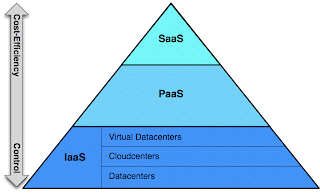
Infrastructure as a Service (IaaS):
Cloud vendors like Amazon (EC2), GoGrid and lots of other smaller players offer compute, storage and networking bandwidth resources on-Demand. Customers can dynamically provision servers and pay only for what they use.
What benefits does IaaS offer?
A lot of IT admin activities are offset to the service provider. Providers offer SLAs to guarantee uptime and over time providers would start offering value added services like automatic backup, update and patch management and multi site hosting capabilities. Don’t think any of these services are offered by any vendor today, but with VMware vCloud platform, providers should be able to offer a lot more value added services at a premium.
It also gives the flexibility to dynamically scale up /down your compute resources based on the demand. Also all the current apps running in your datacenters can be quickly migrated to the cloud without any major changes to the app itself. This has been the key reason for the success of IaaS.
But IaaS does not offer any other notable benefits to the app developers themselves. Though they can leverage the service provider APIs to quickly add new servers, they should still ensure to take care of the app scalability, load balancing and performance tuning.
Hence though IaaS might be the ideal choice for getting your current apps to the cloud, if you are building new apps for the Cloud, you might want to look at the various built in features that PaaS offers to app developers before making the choice.
Platform as a Service (PaaS):
PaaS vendors offer a framework for developers to quickly develop and deploy their apps on the cloud. For example Google App Engine offers developers to build Python and java (beta) apps and deploy them on the Google platform. MS has its azure platform to build .net apps.
What benefits does PaaS Offer:
PaaS totally negates the need for an IT admin to manage the infrastructure of your apps. The infrastructure is totally hidden and only the app development platform is exposed to the users.
Developers also are hugely benefitted by building their apps within the framework exposed by the platform. This would mean that your app can automatically scale from a few hundred users to millions of users. The app developers don't have to worry about adding more resources or performing load balancing tasks to handle the workload.
So what is the drawbacks in the PaaS Approach - First of course is that existing apps will need to be ported or actually it makes sense for only apps that are newly built. It is also going to take time for these platforms to mature and there is also the learning curve for developers to get used to the platform capabilities.
While writing up this blog post, came across the architecture diagrams of Citrix Cloud Center and VMWare vCloud. Gives me the impression that the difference between IaaS and PaaS are going to thin out in the future. Did have a argument with colleagues on whether vCloud would be an IaaS or a PaaS. Remember all the argument around para virtualization and full Virtualization. Do those terms make any sense today!!!

Infrastructure as a Service (IaaS):
Cloud vendors like Amazon (EC2), GoGrid and lots of other smaller players offer compute, storage and networking bandwidth resources on-Demand. Customers can dynamically provision servers and pay only for what they use.
What benefits does IaaS offer?
A lot of IT admin activities are offset to the service provider. Providers offer SLAs to guarantee uptime and over time providers would start offering value added services like automatic backup, update and patch management and multi site hosting capabilities. Don’t think any of these services are offered by any vendor today, but with VMware vCloud platform, providers should be able to offer a lot more value added services at a premium.
It also gives the flexibility to dynamically scale up /down your compute resources based on the demand. Also all the current apps running in your datacenters can be quickly migrated to the cloud without any major changes to the app itself. This has been the key reason for the success of IaaS.
But IaaS does not offer any other notable benefits to the app developers themselves. Though they can leverage the service provider APIs to quickly add new servers, they should still ensure to take care of the app scalability, load balancing and performance tuning.
Hence though IaaS might be the ideal choice for getting your current apps to the cloud, if you are building new apps for the Cloud, you might want to look at the various built in features that PaaS offers to app developers before making the choice.
Platform as a Service (PaaS):
PaaS vendors offer a framework for developers to quickly develop and deploy their apps on the cloud. For example Google App Engine offers developers to build Python and java (beta) apps and deploy them on the Google platform. MS has its azure platform to build .net apps.
What benefits does PaaS Offer:
PaaS totally negates the need for an IT admin to manage the infrastructure of your apps. The infrastructure is totally hidden and only the app development platform is exposed to the users.
Developers also are hugely benefitted by building their apps within the framework exposed by the platform. This would mean that your app can automatically scale from a few hundred users to millions of users. The app developers don't have to worry about adding more resources or performing load balancing tasks to handle the workload.
So what is the drawbacks in the PaaS Approach - First of course is that existing apps will need to be ported or actually it makes sense for only apps that are newly built. It is also going to take time for these platforms to mature and there is also the learning curve for developers to get used to the platform capabilities.
While writing up this blog post, came across the architecture diagrams of Citrix Cloud Center and VMWare vCloud. Gives me the impression that the difference between IaaS and PaaS are going to thin out in the future. Did have a argument with colleagues on whether vCloud would be an IaaS or a PaaS. Remember all the argument around para virtualization and full Virtualization. Do those terms make any sense today!!!
Sunday, April 19, 2009
10 Gbps Networking Performance on XenServer and ESX
A couple of recent posts from VMWare and Citrix seemed to have an interesting correlation. Both of these posts have a very similiar context - dealing with their hypervisor performance with 10 Gig Ethernet Adapters.
The final analysis from the VMWare camp:
Two virtual machines can easily saturate a 10Gbps link (the practical limit is 9.3 Gbps for packets that use the standard MTU size because of protocol overheads), and the thoughput remains constant as we add more virtual machines.
Using Jumbo frames, a single virtual machine can saturate a 10Gbps link on the transmit path and can recieve netwrk traffic at rates up to 5.7 Gbps.
Citrix also announced very similiar results:
we have basically maxxed out bidirectional I/O on a single 10Gb/s link, with only 4 guests. The exact figures are 18.50 Gbps (bidirectional) using 4 guest machines.
I can read the question in your mind: How can the simple Linux Networking stack in XenServer match the virtualization optimized I/O Stack of the ESX VMKernel? Well you got a very valid question and I would like to point you to the dates when the two performance tests were done. ESX performance was done in Nov 2008 and the XenServer results have been declared in April 2009. So what is it that has drastically changed in the 5 months?
The answer is the new Nehelam processors from Intel. The Citrix tests were conducted using the Nehelam processors and IOV enhanced 10Gbps NICs with Solarflare IO acceleration. This offers a powerful direct hardware-to-guest acceleration path that avoids the necessity for the hypervisor to process I/O on behalf of the guests. When the same tests were conducted without the IO acceleration, the XenServer hypervisor CPU got maxxed out at 8.45 Gbps (bidirectional)!!!.
This result leads to an interesting conclusion: Though the optimized VMKernel is far superior to the Xen Kernel, a lot of these features are being offset by the hardware virtualization capabilities built into the processors and NIC adapters by the hardware vendors. This has helped XenServer match or sometimes outperform ESX in terms of hyppervisor performance with both CPU and IO intensive workloads. Believe the IOV Ethernet Adapters should also help XenServer overcome the 6 supported physical NICs limitation.
For a customer, I believe it is the final numbers that matter more than how the performance is achieved. I would rather go with a hardware optimized platform than rely on the s/w stacks to drive performance. What do you say?
The final analysis from the VMWare camp:
Two virtual machines can easily saturate a 10Gbps link (the practical limit is 9.3 Gbps for packets that use the standard MTU size because of protocol overheads), and the thoughput remains constant as we add more virtual machines.
Using Jumbo frames, a single virtual machine can saturate a 10Gbps link on the transmit path and can recieve netwrk traffic at rates up to 5.7 Gbps.
Citrix also announced very similiar results:
we have basically maxxed out bidirectional I/O on a single 10Gb/s link, with only 4 guests. The exact figures are 18.50 Gbps (bidirectional) using 4 guest machines.
I can read the question in your mind: How can the simple Linux Networking stack in XenServer match the virtualization optimized I/O Stack of the ESX VMKernel? Well you got a very valid question and I would like to point you to the dates when the two performance tests were done. ESX performance was done in Nov 2008 and the XenServer results have been declared in April 2009. So what is it that has drastically changed in the 5 months?
The answer is the new Nehelam processors from Intel. The Citrix tests were conducted using the Nehelam processors and IOV enhanced 10Gbps NICs with Solarflare IO acceleration. This offers a powerful direct hardware-to-guest acceleration path that avoids the necessity for the hypervisor to process I/O on behalf of the guests. When the same tests were conducted without the IO acceleration, the XenServer hypervisor CPU got maxxed out at 8.45 Gbps (bidirectional)!!!.
This result leads to an interesting conclusion: Though the optimized VMKernel is far superior to the Xen Kernel, a lot of these features are being offset by the hardware virtualization capabilities built into the processors and NIC adapters by the hardware vendors. This has helped XenServer match or sometimes outperform ESX in terms of hyppervisor performance with both CPU and IO intensive workloads. Believe the IOV Ethernet Adapters should also help XenServer overcome the 6 supported physical NICs limitation.
For a customer, I believe it is the final numbers that matter more than how the performance is achieved. I would rather go with a hardware optimized platform than rely on the s/w stacks to drive performance. What do you say?
Tuesday, April 14, 2009
Evolution of Virtualization
Virtualization in the x86 market has dramatically evolved over the past decade with significant contributions from different players in different technologies like Hardware manufacturers (Intel, AMD), storage providers (Netapp, EMC), Server manufacturers (HP, Cisco), hypervisor software vendors (VMWare, Citrix, MS) and Management app vendors (all big players and countless startups).
In this post, I will describe the major stages in the whole evolutionary process of virtualization.
First Stage - Binary Translation:
It all started in the research labs of VMWare where Rosenbalm and his team were working on a piece of software called the hypervisor that gave the ability to run multiple OS environments on the same piece of hardware.
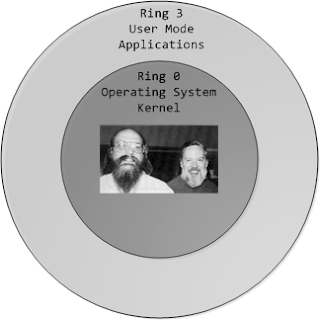
The traditional Operating Systems ran on Ring 0 and the Applications would run on Ring 3. But with virtualization, the hypervisor ran on Ring 0 and that forced the OS to run on Ring 1. This meant that certain previleged CPU instructions generated by the OS would fail since it was running on Ring 1. Rosenbalm and his team invented the technique of binary translation to trap these system calls and run them on behalf of the OS. Over the years, VMWare has effeciently optimized the binary translation technique and has brought down the hypervisor overhead to single digits.
While VMWare was busy perfecting its binary translation code, Intel and AMD were working on getting the virtualization capabilities into the processor itself that led to the next stage in virtualization.
Second Stage - Hardware Virtualization
To overcome the problem of running OS environments on Ring 1, chip vendors developed virtualization enabled processors (Intel VT and AMD Pacifica). These technologies allowed the hypervisor to run on Ring -1 and share the hardware resources between the different OS environments (VMs) running on Ring 0.
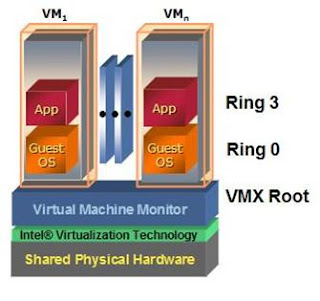
Though the first generation of hardware virtualization did not achieve any significant performance gain over VMWare's binary translation technique, it opened the gates for vendors to quickly develop their own hypervisors. Xen was one of the first few to leverage hardware virtualization and develop an enterprise class hypervisor.
Third Stage - Memory and IO Virtualization:
Till the recent release of the Intel Nehelam processors, the hypervisor had to manage the mapping from the physical memory pages to the virtual pages allotted to the VMs. They used shadow page tables to manage this. With Nehelam, Intel has built Virtualized Memory management into the processor itself. This should free up some more CPU cycles utilized by the hypervisor.
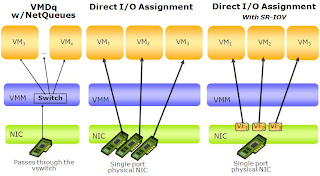
Also the hypervisor network stack was used to process the guest network traffic. This has been a serious bottleneck in scaling the IO performance of the hypervisors. This has been overcome with Intel shipping virtualized networking adapters. This has provided the ability to directly present the physical network adapter to the VM. Refer to the post from Simon Crosby that indicates the performance enhancements when using the SR-IOV 10G adapters with Citrix XenServer.
+.JPG)
With all these improvements, a large portion of the hypervisor functionalities has been sunk into the hardware itself. This has enabled the hypervisors to achieve near native performance and pushed the vendors to build more stable and scalable management apps and advance into the cloud computing paradigm
In this post, I will describe the major stages in the whole evolutionary process of virtualization.
First Stage - Binary Translation:
It all started in the research labs of VMWare where Rosenbalm and his team were working on a piece of software called the hypervisor that gave the ability to run multiple OS environments on the same piece of hardware.
The traditional Operating Systems ran on Ring 0 and the Applications would run on Ring 3. But with virtualization, the hypervisor ran on Ring 0 and that forced the OS to run on Ring 1. This meant that certain previleged CPU instructions generated by the OS would fail since it was running on Ring 1. Rosenbalm and his team invented the technique of binary translation to trap these system calls and run them on behalf of the OS. Over the years, VMWare has effeciently optimized the binary translation technique and has brought down the hypervisor overhead to single digits.

While VMWare was busy perfecting its binary translation code, Intel and AMD were working on getting the virtualization capabilities into the processor itself that led to the next stage in virtualization.
Second Stage - Hardware Virtualization
To overcome the problem of running OS environments on Ring 1, chip vendors developed virtualization enabled processors (Intel VT and AMD Pacifica). These technologies allowed the hypervisor to run on Ring -1 and share the hardware resources between the different OS environments (VMs) running on Ring 0.

Though the first generation of hardware virtualization did not achieve any significant performance gain over VMWare's binary translation technique, it opened the gates for vendors to quickly develop their own hypervisors. Xen was one of the first few to leverage hardware virtualization and develop an enterprise class hypervisor.
Third Stage - Memory and IO Virtualization:
Till the recent release of the Intel Nehelam processors, the hypervisor had to manage the mapping from the physical memory pages to the virtual pages allotted to the VMs. They used shadow page tables to manage this. With Nehelam, Intel has built Virtualized Memory management into the processor itself. This should free up some more CPU cycles utilized by the hypervisor.
Also the hypervisor network stack was used to process the guest network traffic. This has been a serious bottleneck in scaling the IO performance of the hypervisors. This has been overcome with Intel shipping virtualized networking adapters. This has provided the ability to directly present the physical network adapter to the VM. Refer to the post from Simon Crosby that indicates the performance enhancements when using the SR-IOV 10G adapters with Citrix XenServer.
+.JPG)
With all these improvements, a large portion of the hypervisor functionalities has been sunk into the hardware itself. This has enabled the hypervisors to achieve near native performance and pushed the vendors to build more stable and scalable management apps and advance into the cloud computing paradigm
Friday, March 27, 2009
XenServer Management Series
Was checking out the Zoho apps and found the slide show tool interesting. So this post will be an embedded slide show.
However to ensure that Google indexes my blog properly and keeps sending me some hits, here are the major contents:
XenServer Management Series Categories:
❖Migration (P2V) and Capacity Planning
❖Monitoring and Management
❖High Availability and Fault Tolerance
❖Backup and Disaster Recovery
❖Automation and Lifecycle Management
❖Cloud Platform
Keep watching this space for more updates...
However to ensure that Google indexes my blog properly and keeps sending me some hits, here are the major contents:
XenServer Management Series Categories:
❖Migration (P2V) and Capacity Planning
❖Monitoring and Management
❖High Availability and Fault Tolerance
❖Backup and Disaster Recovery
❖Automation and Lifecycle Management
❖Cloud Platform
Keep watching this space for more updates...
Monday, March 16, 2009
Access your Digital Camera from a VM
Recently one customer had asked me about using a VM to test USB connected devices like Digicams. I knew that USB devices was something that was not supported by enterprise class hypervisors (ESX, XenServer).
So decided to give it a shot using desktop hypervisor Virtual Box from Sun. Attached the USB digicam to my desktop (did not have any specific drivers on the desktop). Created a VM using VirtualBox and attached the USB device to it. The USB device appeared in the VM and on installing the digicam drivers in the VM, was able to access the digicam contents from the VM. Wow!!!
Virtualbox seems to use some filter drivers to bypass the USB device to the VM. Believe VMWare workstation should also definitely have a similiar functionality, but I have always been a big fan of the sleek and lightweight hypervisor from VirtualBox.
Isn't that a cool feature
So decided to give it a shot using desktop hypervisor Virtual Box from Sun. Attached the USB digicam to my desktop (did not have any specific drivers on the desktop). Created a VM using VirtualBox and attached the USB device to it. The USB device appeared in the VM and on installing the digicam drivers in the VM, was able to access the digicam contents from the VM. Wow!!!
Virtualbox seems to use some filter drivers to bypass the USB device to the VM. Believe VMWare workstation should also definitely have a similiar functionality, but I have always been a big fan of the sleek and lightweight hypervisor from VirtualBox.
Isn't that a cool feature
Saturday, March 7, 2009
Hypervisor Storage Integration - Is Citrix leading the Game?
Had posted in my previous post on the feature comparison between XenServer and ESX.
Apart from those, storage integration has been one area where Citrix has been leading the game. XenServer 5.0 has built in integration with NetApp and EqualLogic storage arrays. This enables XenServer to leverage the storage features like Snapshotting, Fast clone and thin provisioning.
Though this might not have a serious performance implications for normal workloads, this integration makes XenServer more suitable for disk intensive workloads and for apps like VDI and LabManager. Both VDI and Labmanager rely extensively on the fast clone and snapshot features. Offloading these functions to the storage should give users noticeable I/O performance enhancements and also free up CPU cycles on the Server. I am not aware of XenApp using the fast clone technology like VMWare View Manager does, but Citrix Labmanager (OEMd from VMLogix) extensively uses this feature and should be interesting to note the performance differences between VMLogix Labmanager on ESX and on XenServer with NetApp storage.
Citrix has gone another step further by introducing the new product - Virtual Storage Manager (VSM) for both XenServer and Hyper-V. This product integrates with the leading storage vendors and provides the capabilities to carve out LUNs on the arrays on demand and present them to the hypervisors. This should fill the gap with the non-availability of Cluster file system in Hyper-V. Being a 1.0 product, it seems to lack functionalities in terms of the no. of storage vendors it supports and also support for Zoning of the FC switches. But this definitely is an interesting product to watch out for.
In my view VSM should boost the virtualization of I/O intensive production apps. By mapping storage LUNs straight to the VMs, you can provide the same performance and reliability to the VMs as that of physical machines. By automating and integrating storage provisioning with the hypervisor tools, Citrix has given the flexibility to quickly provision the VMs On Demand.
VMWare is definitely not lagging far behind. VMWare has announced the vStorage framework for integrating drivers and features specific to storage vendors into ESX 4.0. Should be interesting to watch if VMWare can come out with a broader vendor support and more features compared to Citrix in vStorage.
Let's wait and watch.
Apart from those, storage integration has been one area where Citrix has been leading the game. XenServer 5.0 has built in integration with NetApp and EqualLogic storage arrays. This enables XenServer to leverage the storage features like Snapshotting, Fast clone and thin provisioning.
Though this might not have a serious performance implications for normal workloads, this integration makes XenServer more suitable for disk intensive workloads and for apps like VDI and LabManager. Both VDI and Labmanager rely extensively on the fast clone and snapshot features. Offloading these functions to the storage should give users noticeable I/O performance enhancements and also free up CPU cycles on the Server. I am not aware of XenApp using the fast clone technology like VMWare View Manager does, but Citrix Labmanager (OEMd from VMLogix) extensively uses this feature and should be interesting to note the performance differences between VMLogix Labmanager on ESX and on XenServer with NetApp storage.
Citrix has gone another step further by introducing the new product - Virtual Storage Manager (VSM) for both XenServer and Hyper-V. This product integrates with the leading storage vendors and provides the capabilities to carve out LUNs on the arrays on demand and present them to the hypervisors. This should fill the gap with the non-availability of Cluster file system in Hyper-V. Being a 1.0 product, it seems to lack functionalities in terms of the no. of storage vendors it supports and also support for Zoning of the FC switches. But this definitely is an interesting product to watch out for.
In my view VSM should boost the virtualization of I/O intensive production apps. By mapping storage LUNs straight to the VMs, you can provide the same performance and reliability to the VMs as that of physical machines. By automating and integrating storage provisioning with the hypervisor tools, Citrix has given the flexibility to quickly provision the VMs On Demand.
VMWare is definitely not lagging far behind. VMWare has announced the vStorage framework for integrating drivers and features specific to storage vendors into ESX 4.0. Should be interesting to watch if VMWare can come out with a broader vendor support and more features compared to Citrix in vStorage.
Let's wait and watch.
ESX Vs XenServer - Technical Comparison
In the last post, had written about the free version of XenServer and the impacts in the market.
Now to the real technical differences between ESX and XenServer. The areas where XenServer is lagging behind ESX are:
1. Memory Overcommit - Though MS and Citrix have been trying to push this as just a nice to have feature, overcommit really makes a big difference in the TCO of the solution and VMWare has never missed an opportunity to point this out. Believe XenServer should be getting this in its next release.
2. Resource Pools - VMWare has got its foundations really strong by defining Clusters and Resource Pools. Resource Pools provides the IT admins to allocate resources to a group of VMs (belonging to a specific department). VMWare has cleverly leveraged this in its management products including LabManager and StageManager.
3. Distributed Resource Scheduler (DRS) - Another reason why ESX is the darling of IT admins. DRS clubbed with HA has made life very peaceful for IT admins around the globe. Though XenServer already has HA (infact claims to have Fault Tolerance), hoping to see DRS also get into the solution soon.
4. Strong Community Participation - This is something that VMWare has built over the years. VMWare communities and forums are a wealth of ESX tips and tricks and it is going to take Citrix years to catch up on that. Hope Citrix focuses on this as it gets more traction in the enterprises.
Areas where Citrix has an edge over VMWare include Storage Integrations (will put up a separate post on that) and XenServer HA (Zero downtime) technology OEMd from Marathon. Have not really heard much about the technology from Marathon so will not comment on that.
Have focused only on the difference between VC+ESX and XenCenter+XenServer. Will probably put up a different post highlighting the differences in the management stack.
Feel free to comment on any areas that I have missed out.
Update: Had missed out on a minor but useful feature that XenCenter provides. The ability to search for VMs based on different criteria. Believe this should be a useful feature as the virtualization deployments grow in size. Had noted VMWare was getting this into the next version of vCenter!!!
Now to the real technical differences between ESX and XenServer. The areas where XenServer is lagging behind ESX are:
1. Memory Overcommit - Though MS and Citrix have been trying to push this as just a nice to have feature, overcommit really makes a big difference in the TCO of the solution and VMWare has never missed an opportunity to point this out. Believe XenServer should be getting this in its next release.
2. Resource Pools - VMWare has got its foundations really strong by defining Clusters and Resource Pools. Resource Pools provides the IT admins to allocate resources to a group of VMs (belonging to a specific department). VMWare has cleverly leveraged this in its management products including LabManager and StageManager.
3. Distributed Resource Scheduler (DRS) - Another reason why ESX is the darling of IT admins. DRS clubbed with HA has made life very peaceful for IT admins around the globe. Though XenServer already has HA (infact claims to have Fault Tolerance), hoping to see DRS also get into the solution soon.
4. Strong Community Participation - This is something that VMWare has built over the years. VMWare communities and forums are a wealth of ESX tips and tricks and it is going to take Citrix years to catch up on that. Hope Citrix focuses on this as it gets more traction in the enterprises.
Areas where Citrix has an edge over VMWare include Storage Integrations (will put up a separate post on that) and XenServer HA (Zero downtime) technology OEMd from Marathon. Have not really heard much about the technology from Marathon so will not comment on that.
Have focused only on the difference between VC+ESX and XenCenter+XenServer. Will probably put up a different post highlighting the differences in the management stack.
Feel free to comment on any areas that I have missed out.
Update: Had missed out on a minor but useful feature that XenCenter provides. The ability to search for VMs based on different criteria. Believe this should be a useful feature as the virtualization deployments grow in size. Had noted VMWare was getting this into the next version of vCenter!!!
Citrix XenServer goes Free - Impacts and Implications
The hypervisor war has seen a major twist with Citrix giving away XenServer 5 including the management product XenCenter for free. Personally I have been working with XenServer recently and should say that the product has improved dramatically and is worthy of being called a matured hypervisor.
VMware execs had brushed aside the implications of the announcement mocking at the worthiness of a "FREE" hypervisor in enterprises. But in my opinion, this has been a brilliant and a well timed move from Citrix. So far inspite of having a decent product, Citrix has been unable to break into the loyal customer base (or should I say fan following) that VMWare has.
By making XenServer free, Citrix has made an offer that enterprises can not reject. This will definitely get customers to atleast consider/evaluate XenServer for their deployments.
With Citrix pushing XenServer hard through its strong Sales Channels, should be interesting to observe the Hypervisor market over the next year.
VMware execs had brushed aside the implications of the announcement mocking at the worthiness of a "FREE" hypervisor in enterprises. But in my opinion, this has been a brilliant and a well timed move from Citrix. So far inspite of having a decent product, Citrix has been unable to break into the loyal customer base (or should I say fan following) that VMWare has.
By making XenServer free, Citrix has made an offer that enterprises can not reject. This will definitely get customers to atleast consider/evaluate XenServer for their deployments.
With Citrix pushing XenServer hard through its strong Sales Channels, should be interesting to observe the Hypervisor market over the next year.
Sunday, February 1, 2009
One more Rewarding Quarter for VMWare
At a time when layoffs and pink slips seem to be the talk of the day, atleast one company has managed a double digit % growth in 4th Quarter revenues compared to the previous year (actually 25%!!!).
Yes you read it right VMWare posts impressive results for the 4th Quarter and for the whole year 2008.
As a techie, I should confess that these numbers GAAP/Non GAAP profits/revenues really make no sense to me. What really impressed me was the lineup of strategic partnerships VMWare had announced with leading Datacenter management firms CA (vCenter Stage Manager), HP (vCenter Lab Manager) and BMC (vCenter Lifecycle Manager). This seems to be a clever move by VMWare to integrate its own virtualization managemment suite with the leading datacenter management products. This should give VMWare management products (apart from VC which is already widely accepted) better credibility in making its foray into the enterprise datacenters.
The other major announcements include vCloud initiative (will write more on this in a separate post), Mobile Virtualization platform and the highly publicized release of VMWare View.
Looking forward to another great year 2009 for VMWare and do look forward to more REGULAR POSTS in this blog :-)
Cheers,
Agent Pal
Yes you read it right VMWare posts impressive results for the 4th Quarter and for the whole year 2008.
As a techie, I should confess that these numbers GAAP/Non GAAP profits/revenues really make no sense to me. What really impressed me was the lineup of strategic partnerships VMWare had announced with leading Datacenter management firms CA (vCenter Stage Manager), HP (vCenter Lab Manager) and BMC (vCenter Lifecycle Manager). This seems to be a clever move by VMWare to integrate its own virtualization managemment suite with the leading datacenter management products. This should give VMWare management products (apart from VC which is already widely accepted) better credibility in making its foray into the enterprise datacenters.
The other major announcements include vCloud initiative (will write more on this in a separate post), Mobile Virtualization platform and the highly publicized release of VMWare View.
Looking forward to another great year 2009 for VMWare and do look forward to more REGULAR POSTS in this blog :-)
Cheers,
Agent Pal
Monday, May 5, 2008
The beginning of the Virtual Journey
It all started a couple of years earlier when I first started playing with Xen and installed it on my laptop. Not because of self interest but only because our final sem internship project was on Xen. The install and configuration of Xen itself turned out to be a mini project :-). But it was worth the effort to see the excitement and surprise of friends and profs to see two Linux VMs running on the same laptop.
Xen has come a long way from being a stanford university project to a production ready solution from Citrix. Usability has improved many fold and today all you need to do is plug in a USB stick and you are all set to go!!! The big guy vmware has leaped even further and made ESX installable on a VM in Vmware workstation running on a laptop.
Virtualization is turning out to be a fantastic technology and in this blog, I will be sharing my virtual thoughts and experiences. Get ready for the Virtual Journey.
Xen has come a long way from being a stanford university project to a production ready solution from Citrix. Usability has improved many fold and today all you need to do is plug in a USB stick and you are all set to go!!! The big guy vmware has leaped even further and made ESX installable on a VM in Vmware workstation running on a laptop.
Virtualization is turning out to be a fantastic technology and in this blog, I will be sharing my virtual thoughts and experiences. Get ready for the Virtual Journey.
Subscribe to:
Posts (Atom)