Part 1: Meeting with the Dev/Test Lab Administrator - Read here before starting Part 2 below.
Part 2: Meeting the Dev and Test Engineers
Abbie’s Dev/Test Lab
(Ziva, Test Lead and Tony, Dev Lead walk into the lab)
Ziva – Shut up Tony. That bug was not because of a setup issue. I know it was a REAL bug.
Tony – Ho Ho…I never said it wasn’t a bug Lady…All I am asking of you is to reproduce it.
Ziva – Hmmm…I am going to do just that Mr. Developer. Just wait till we discuss with Abbie. Abbie, could you re-setup the test bed you gave me yesterday. I need to kick Tony’s butt with that stupid bug.
Tony – Alright Miss. Perfect. How many times have you raised defects only to find that the s/w config was not setup correctly, the Environment variable was not set properly, the right version of the required s/w was not installed blah blah blah…
Abbie – Guys Guys…STOP….Agent Pal could you help us here before these guys eat up each other
Agent Pal – Ha ha…no problem guys…I have the right solution…Ziva, would you love it if you could capture the test bed right when the bug happens and push it out to Tony…File a defect with the link to the bug reproduced???
Ziva – Are you serious?? Can we do that?
Agent Pal – Yup…and you can also record all the user actions while the bug happens as a movie and let Tony watch it!!!
Ziva – Wow…That is unbelievable…That is going to save me weeks of testing cycles. How many times have I had to re-create bugs only bcoz the stubborn dev couldn’t reproduce it and wouldn’t accept the defect..
Agent Pal – Totally agree….And you also automate all the manual steps involved in setting up the test bed…prevents any manual errors…
Ziva – You are just awesome Pal (Gives Pal a big hug). Abbie – when are we getting this LabManager in our lab. I am going to tell my Boss that we can complete the whole testing cycle in 30 days – instead of 50 days. Am sure to get a fat pay hike and a promotion this year
Tony – Mr. Pal, once you can stop blushing, and recover from that hug from Ziva, could I ask you a favour?
Agent Pal – Sure, shoot it Tony
Tony – Well my team designs and develops some large distributed systems that run the company’s online e-commerce portal. And I would like to create some of these N-Tier systems in the lab, today it takes me days to get the networks setup, VMs configured and have the system up. Anyway that your solution could speed up this process.
Agent Pal – Of course yes. You can use LabManager to design and deploy some of these complex multi tier applications.
Tony – I don’t want to tussle with the networking folks to setup the network and then beg abbie to give me the VM resources. Can that be done.
Agent Pal – Why not. It is as simple as defining the VM roles, network settings etc. in LabManager and just hit deploy. LabManager automatically brings up the whole system – and it can be an exact replica of your production application.
Tony – Wow that sounds cool. If it is going to be really that SIMPLE, I am going to give you a big hug too.
Agent Pal – Oops…I guess just a hand shake will do.
Tony – Hmmm..Okay.
(Michele, Marketing dept walks into the lab)
Michele - Abbie, I had requested for a Wiki Server to run our new marketing campaign – is it ready. We need to go live next week?
Abbie – You need to give me more time Michele. You wanted the Wiki to be accessible over the internet. That has to get cleared by the Networking and the Security Folks. Will let you know when it is done.
(Michele walks away)
Agent Pal – You should probably let her self-provision pre-built secure Wiki servers using the Citrix Self Service Portal.
Abbie – Ha ha…None of your solutions are gonna work here Pal That lady is just DUMB …Nevermind she will never be able to do that.
Agent Pal – Oh …The Self Service Portal servers just that purpose. A Super Simple UI where even the most Non-Tech folks can get what they want. You should try that with Michele.
Abbie – Will do Pal. And I want to charge these folks for the VMs that they run. So they learn to use the resources scarcely.
Agent Pal – Definitely. You should look at the billing code functionality built into Self Service Portal. Lets you generate monthly reports on how much resources your users have consumed.
Abbie – Ya…that will be handy. Btw you should meet McGee, the Geek who manages our Production Infrastructure. Your solution has been wonderful and I am sure McGee could use your help too.
Part 3 – Meeting with the Production Infrastructure Administrator
To be Continued….
Note: All characters depicted above are purely fictitious and bear no resemblance to anyone alive or dead – however any similarity to the fictitious characters of NCIS is purely intentional.
This blog is my personal and all the contents here are my personal comments and have no bearing on my employer.
Showing posts with label Citrix XenServer. Show all posts
Showing posts with label Citrix XenServer. Show all posts
Thursday, July 1, 2010

Tuesday, April 14, 2009
Evolution of Virtualization
Virtualization in the x86 market has dramatically evolved over the past decade with significant contributions from different players in different technologies like Hardware manufacturers (Intel, AMD), storage providers (Netapp, EMC), Server manufacturers (HP, Cisco), hypervisor software vendors (VMWare, Citrix, MS) and Management app vendors (all big players and countless startups).
In this post, I will describe the major stages in the whole evolutionary process of virtualization.
First Stage - Binary Translation:
It all started in the research labs of VMWare where Rosenbalm and his team were working on a piece of software called the hypervisor that gave the ability to run multiple OS environments on the same piece of hardware.
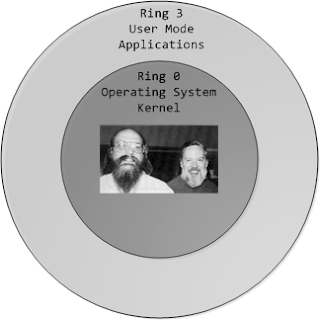
The traditional Operating Systems ran on Ring 0 and the Applications would run on Ring 3. But with virtualization, the hypervisor ran on Ring 0 and that forced the OS to run on Ring 1. This meant that certain previleged CPU instructions generated by the OS would fail since it was running on Ring 1. Rosenbalm and his team invented the technique of binary translation to trap these system calls and run them on behalf of the OS. Over the years, VMWare has effeciently optimized the binary translation technique and has brought down the hypervisor overhead to single digits.
While VMWare was busy perfecting its binary translation code, Intel and AMD were working on getting the virtualization capabilities into the processor itself that led to the next stage in virtualization.
Second Stage - Hardware Virtualization
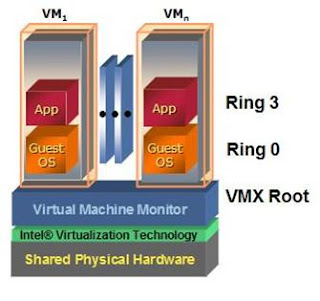
To overcome the problem of running OS environments on Ring 1, chip vendors developed virtualization enabled processors (Intel VT and AMD Pacifica). These technologies allowed the hypervisor to run on Ring -1 and share the hardware resources between the different OS environments (VMs) running on Ring 0.
Though the first generation of hardware virtualization did not achieve any significant performance gain over VMWare's binary translation technique, it opened the gates for vendors to quickly develop their own hypervisors. Xen was one of the first few to leverage hardware virtualization and develop an enterprise class hypervisor.
Third Stage - Memory and IO Virtualization:
Till the recent release of the Intel Nehelam processors, the hypervisor had to manage the mapping from the physical memory pages to the virtual pages allotted to the VMs. They used shadow page tables to manage this. With Nehelam, Intel has built Virtualized Memory management into the processor itself. This should free up some more CPU cycles utilized by the hypervisor.
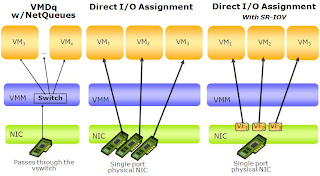
Also the hypervisor network stack was used to process the guest network traffic. This has been a serious bottleneck in scaling the IO performance of the hypervisors. This has been overcome with Intel shipping virtualized networking adapters. This has provided the ability to directly present the physical network adapter to the VM. Refer to the post from Simon Crosby that indicates the performance enhancements when using the SR-IOV 10G adapters with Citrix XenServer.
+.JPG)
With all these improvements, a large portion of the hypervisor functionalities has been sunk into the hardware itself. This has enabled the hypervisors to achieve near native performance and pushed the vendors to build more stable and scalable management apps and advance into the cloud computing paradigm
In this post, I will describe the major stages in the whole evolutionary process of virtualization.
First Stage - Binary Translation:
It all started in the research labs of VMWare where Rosenbalm and his team were working on a piece of software called the hypervisor that gave the ability to run multiple OS environments on the same piece of hardware.
The traditional Operating Systems ran on Ring 0 and the Applications would run on Ring 3. But with virtualization, the hypervisor ran on Ring 0 and that forced the OS to run on Ring 1. This meant that certain previleged CPU instructions generated by the OS would fail since it was running on Ring 1. Rosenbalm and his team invented the technique of binary translation to trap these system calls and run them on behalf of the OS. Over the years, VMWare has effeciently optimized the binary translation technique and has brought down the hypervisor overhead to single digits.

While VMWare was busy perfecting its binary translation code, Intel and AMD were working on getting the virtualization capabilities into the processor itself that led to the next stage in virtualization.
Second Stage - Hardware Virtualization
To overcome the problem of running OS environments on Ring 1, chip vendors developed virtualization enabled processors (Intel VT and AMD Pacifica). These technologies allowed the hypervisor to run on Ring -1 and share the hardware resources between the different OS environments (VMs) running on Ring 0.

Though the first generation of hardware virtualization did not achieve any significant performance gain over VMWare's binary translation technique, it opened the gates for vendors to quickly develop their own hypervisors. Xen was one of the first few to leverage hardware virtualization and develop an enterprise class hypervisor.
Third Stage - Memory and IO Virtualization:
Till the recent release of the Intel Nehelam processors, the hypervisor had to manage the mapping from the physical memory pages to the virtual pages allotted to the VMs. They used shadow page tables to manage this. With Nehelam, Intel has built Virtualized Memory management into the processor itself. This should free up some more CPU cycles utilized by the hypervisor.
Also the hypervisor network stack was used to process the guest network traffic. This has been a serious bottleneck in scaling the IO performance of the hypervisors. This has been overcome with Intel shipping virtualized networking adapters. This has provided the ability to directly present the physical network adapter to the VM. Refer to the post from Simon Crosby that indicates the performance enhancements when using the SR-IOV 10G adapters with Citrix XenServer.
+.JPG)
With all these improvements, a large portion of the hypervisor functionalities has been sunk into the hardware itself. This has enabled the hypervisors to achieve near native performance and pushed the vendors to build more stable and scalable management apps and advance into the cloud computing paradigm
Subscribe to:
Posts (Atom)